 WakeBuddy
AlarmKit Explained: Why Third-Party Alarms Can Finally Ring in Silent Mode
Before iOS 26, alarm apps couldn't ring through Silent mode like the Clock app. AlarmKit changed that. What it does, its limits, and how to check your app.
An alarm app from the App Store can now ring when your iPhone is in Silent mode, the same way the Clock app does. The basics: your iPhone runs iOS 26 or later, the app is built on Apple's AlarmKit, and you allowed it to schedule alarms. There are a couple of catches, which we cover below.
Before iOS 26, that wasn't possible for most apps, which is why so many forum answers still say that third-party alarms don't work on silent. We build WakeBuddy, a talking alarm clock, on AlarmKit, so this guide explains what changed, what AlarmKit still can't do, and how to check that your alarm will actually ring tomorrow.
Key takeaways
- On iOS 26 and later, alarms made with AlarmKit ring in Silent mode and break through every Focus, just like Clock alarms.
- The app needs your permission to schedule alarms, and it can't be hidden or locked behind Face ID. If it is, its alarms silently fail.
- Pressing any physical button stops a ringing AlarmKit alarm, and on iOS 26 the volume comes from your Ringtone and Alerts slider, not from the app.
Why alarm apps used to stay quiet in Silent mode
Until iOS 26, an app that wanted to wake you up at 7:00 had one main tool: a scheduled notification. Notifications are treated as alerts, and Apple's iPhone User Guide is clear about what Silent mode does to those: when it's on, "iPhone doesn't ring or play alerts or other sound effects." The same page lists the exception: "Clock alarms, audio apps such as Music, and many games play sounds through the built-in speaker, even when Silent mode is on" (Apple).
So the Clock app could ring through Silent mode, and alarm apps mostly couldn't. Notifications had another limit too: a notification sound has to be shorter than 30 seconds, and if it's longer, the system plays the default sound instead (Apple Developer Documentation).
For notifications, there was one official way through Silent mode: critical alerts. They can play a sound even when the phone is muted or in Do Not Disturb, but an app needs a special entitlement from Apple to use them (Apple Developer Documentation).
What AlarmKit changed
AlarmKit is a framework Apple added in iOS 26 that lets apps "schedule prominent alarms and countdowns" (Apple Developer Documentation). In its WWDC25 session, Apple describes what happens when one fires: "the alert breaks through the silent mode and the current focus" (WWDC25: Wake up to the AlarmKit API).
In practice, an AlarmKit alarm behaves much more like a Clock alarm than like a notification:
- It rings in Silent mode and through Focus. Apple's AlarmKit FAQ for developers says there is no Focus mode that AlarmKit alarms can't break through (Apple Developer Forums).
- It survives a restart or a force quit. Once an alarm is scheduled, Apple says it's expected to persist through a reboot, a force quit or an app crash (AlarmKit FAQ). You don't need to leave the app open overnight.
- It looks like an alarm. On a locked iPhone you get a full-screen alarm alert (since iOS 26.1, you swipe to stop it), and an app can show a countdown on the Lock Screen and in the Dynamic Island, for example during a snooze. Alarms also appear in StandBy and on a paired Apple Watch (WWDC25).
- You decide which apps get it. People opt in for each app, and an app has to explain in its permission prompt why it wants to schedule alarms (WWDC25; Apple Developer Documentation). You can change your answer later in the Settings app.
| Notification-based alarm (before iOS 26) | AlarmKit alarm (iOS 26 and later) | |
|---|---|---|
| Silent mode | Muted, like other alerts | Rings |
| Focus and Do Not Disturb | Depends on how the Focus is set up | Breaks through every Focus |
| Sound | Under 30 seconds per notification | Repeats while the alarm rings |
| What you see | A notification banner | An alarm alert, plus an optional Lock Screen countdown |
| Permission | Notifications | Alarms |
How to tell if your alarm app uses AlarmKit
There's no "AlarmKit" label on the App Store, but there are a few good signs:
- It asks to schedule alarms. An AlarmKit app has to ask for alarm permission, which is a separate prompt from the usual notification prompt.
- It rings like the Clock app. On a locked iPhone you see a full alarm alert, not a notification banner, and it keeps ringing until you act.
- It requires iOS 26 or later. That's a hint, not proof: an app can require iOS 26 for other reasons, and an app that supports older versions can still use AlarmKit on iOS 26.
The only test that really counts: turn on Silent mode and your Focus, set an alarm in the app for two minutes from now, lock the phone and put it down. If it rings, you're covered.
A checklist before you trust it with a 6 a.m. flight
- Allow alarms for the app. If you tapped "Don't Allow" during setup, the app can't schedule alarms at all. Turn the permission back on in Settings, under the app's name.
- Don't hide the app or lock it with Face ID. This is the easy one to miss. Apple's FAQ says AlarmKit doesn't work for apps that are hidden or require a passcode, Touch ID or Face ID to open, and their alarms "silently fail" (AlarmKit FAQ).
- Check the volume slider. On iOS 26, Clock alarms follow the slider under Settings > Sounds & Haptics > Ringtone and Alerts, and if Change with Buttons is on, the volume buttons move it too (Apple). From building WakeBuddy, we know AlarmKit alarms from other apps follow the same slider on iOS 26, and the app can't raise it. On iOS 27, Clock alarms get their own Alarms and Timers setting (Apple). We haven't yet tested on a real device which setting third-party alarms follow there, so check your ringtone volume and both the Alarms and Timers and the Alerts and System Sounds settings.
- Don't set two apps for the same minute. If alarms from several apps are due at the same time, Apple says which one goes off is non-deterministic (AlarmKit FAQ). Space them a few minutes apart.
What AlarmKit doesn't let apps do
AlarmKit gives apps the Clock app's reach, not unlimited control. A few limits matter for how alarm apps behave:
- Any physical button stops the alarm. Pressing a button that AlarmKit reacts to, such as the side button, stops the alarm that's ringing, and if several are ringing, it stops all of them (AlarmKit FAQ). An app can't turn that off.
- Stop belongs to the system. Since iOS 26.1, the alarm alert uses a system-provided stop control, and the old option to customize that button is deprecated (Apple Developer Documentation). An app gets one more button of its own, usually Snooze or "open the app."
- It isn't a critical alert. Apple says alarms are not a replacement for critical alerts or time-sensitive notifications (WWDC25). They're for wake-ups and timers.
What we learned building WakeBuddy on AlarmKit
Before we wrote WakeBuddy's alarm logic, we tested AlarmKit on an iPhone 11 running iOS 26. A Mac listened through its microphone, timed every sound and even said the wake-up phrase out loud. A few results surprised us.
From our test iPhone
- 75 s+of continuous alarm sound in our test: it kept repeating until we stopped it
- 300alarms scheduled by one app without an error
- ≈ 2 sfrom tapping the alarm's second button on a locked iPhone to the app's own screen
The physical-button rule shaped the whole app. Apple's FAQ says an app's stop action runs whenever an alarm is dismissed, by swiping or with the power button. On our test iPhone, though, silencing the alarm with the side button stopped the sound, but the "alarm stopped" signal never reached the app, so WakeBuddy couldn't react afterwards. Instead, it schedules backup alarms in advance: if you silence it with a button and go back to sleep, a backup rings about 90 seconds later, up to three times per alarm.
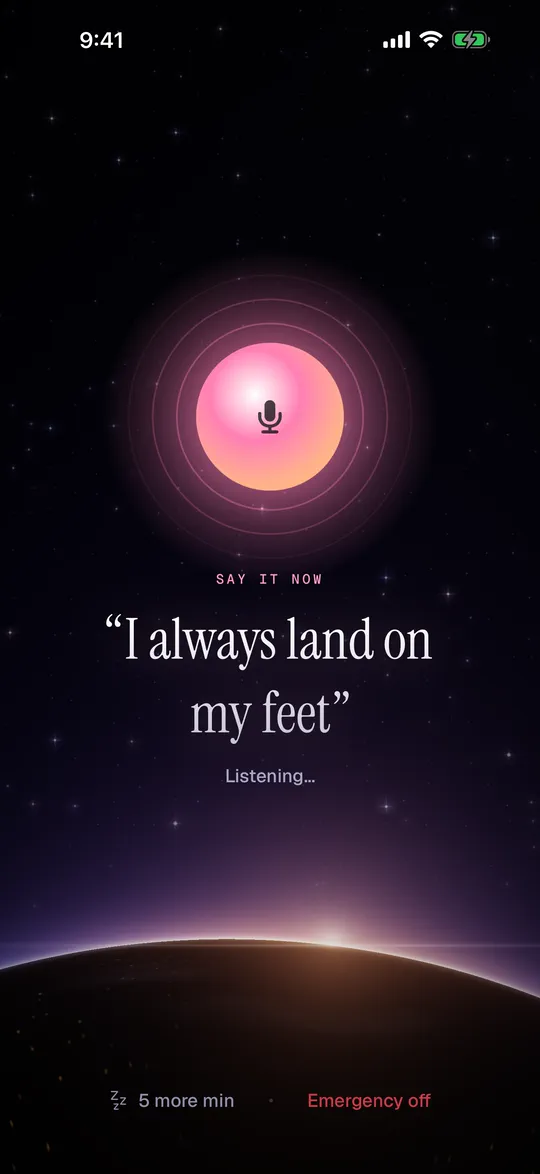
The system stop control was the second design problem. WakeBuddy's alarm is supposed to stop only when you say your phrase out loud, but the stop swipe belongs to iOS. So in WakeBuddy, stopping the alarm opens the phrase screen, and the backups keep running until you've said it (or typed it).
Where WakeBuddy fits
WakeBuddy is our talking alarm clock for iPhone. A character wakes you up instead of a beep, from a drill sergeant to a cat who wants breakfast, and every snooze brings them back louder and less patient. Because it's built on AlarmKit, it rings in Silent mode and Focus, it keeps working after a restart, and the snooze countdown shows on your Lock Screen. If it can't make out your phrase after three tries, you can type it instead.
It's not for everyone. It needs iOS 26 or later, so it won't run on an iPhone that can't update to iOS 26. And if you're deaf or hard of hearing, a vibrating alarm will serve you better than any voice.
FAQ
Will a third-party alarm app ring if my iPhone is on silent?
On iOS 26 or later, yes, if the app uses AlarmKit and you allowed it to schedule alarms. Older apps that still rely on notifications are muted by Silent mode.
Do I need to keep the alarm app open overnight?
No. Apple says AlarmKit alarms are expected to persist through a restart, a force quit or an app crash (AlarmKit FAQ).
Why didn't my alarm app ring even though it uses AlarmKit?
The most common reasons are a low Ringtone and Alerts volume on iOS 26, alarm permission turned off in Settings, or an app that's hidden or locked with Face ID. Test it with a two-minute alarm before you rely on it.
Can an alarm app ring louder than my volume setting?
Not on iOS 26. AlarmKit alarms play at the volume from your settings, and the app can't change it. All an app can do is ship louder sound files.
Sources
- Apple. Wake up to the AlarmKit API. WWDC25, session 230. 2025.
- Apple. AlarmKit. Apple Developer Documentation.
- Apple Developer Technical Support. AlarmKit FAQ. Apple Developer Forums, 2025.
- Apple. NSAlarmKitUsageDescription. Apple Developer Documentation.
- Apple. AlarmPresentation.Alert. Apple Developer Documentation.
- Apple. UNNotificationSound. Apple Developer Documentation.
- Apple. Critical alerts entitlement. Apple Developer Documentation.
- Apple. Silence iPhone. iPhone User Guide, iOS 26.
- Apple. Set an alarm in Clock on iPhone: iOS 26, iOS 27. iPhone User Guide.